

Aralez (Արալեզ)
Reverse proxy built on top of Cloudflare's Pingora
Aralez is a high-performance Rust reverse proxy with zero-configuration automatic protocol handling, TLS, and upstream management, featuring Consul and Kubernetes integration for dynamic pod discovery and health-checked routing, acting as a lightweight ingress-style proxy.
What Aralez means ? Aralez = Արալեզ Named after the legendary Armenian guardian spirit, winged dog-like creature, that descend upon fallen heroes to lick their wounds and resurrect them.
Built on Rust, on top of Cloudflare’s Pingora engine, Aralez delivers world-class performance, security and scalability — right out of the box.

Key Features
- Dynamic Config Reloads — Upstreams can be updated live via API, no restart required.
- Autoload of certificates — Automatically loads new/changed certificates from a folder, without a restart.
- Let’s Encrypt Certificates — Ordering and renewal of SSL/TLS certificates via the HTTP-01 challenge.
- Upstreams TLS detection — Aralez will automatically detect if upstreams uses secure connection.
- Built in rate limiter — Globar or route limit requests to upstreams.
- Authentication — Supports Basic Auth, API tokens, and JWT verification.
- Basic Auth
- API Key via
x-api-keyheader - JWT Auth, with tokens issued by Aralez itself via
/jwtAPI - Forward Auth, Sends requests to an authentication server.
- Load Balancing Round-robin, health checks, optional sticky sessions.
- Built in file server — Build in minimalistic file server for serving static files, should be added as upstreams for public access.
- Upstream Providers:
fileUpstreams are declared in config file.consulUpstreams are dynamically updated from Hashicorp Consul.kubernetesUpstreams are dynamically updated from kubernetes api server.
- Auto WebSocket Support: WS connection upgrades are handled automatically.
- Auto gRPC Support: gRPC detected and handled automatically.
- Header Injection: Global and per-route server/client headers injection.
- Remote Config Push: Lightweight HTTP API to update configs from CI/CD or other systems.
- Memory Safe — 100% Rust.
- High Performance — Built with Pingora and tokio for async I/O.
Configuration Overview
main.yaml
| Key | Example Value | Description |
|---|---|---|
| threads | 12 | Number of running daemon threads. Optional, defaults to 1 |
| runuser | aralez | Optional, Username for running aralez after dropping root privileges, requires to launch as root |
| rungroup | aralez | Optional,Group for running aralez after dropping root privileges, requires to launch as root |
| daemon | false | Run in background (boolean) |
| upstream_keepalive_pool_size | 500 | Pool size for upstream keepalive connections |
| pid_file | /tmp/aralez.pid | Path to PID file |
| error_log | /tmp/aralez_err.log | Path to error log file |
| upgrade_sock | /tmp/aralez.sock | Path to live upgrade socket file |
| config_address | 0.0.0.0:3000 | HTTP API address for pushing upstreams.yaml from remote location |
| proxy_tls_grade | (high, medium, unsafe) | Grade of TLS ciphers, for easy configuration. High matches Qualys SSL Labs A+ (defaults to medium) |
| config_tls_key_file | etc/key.pem | Private Key file path. Mandatory if proxy_address_tls is set, else optional |
| proxy_address_http | 0.0.0.0:6193 | Aralez HTTP bind address |
| proxy_address_tls | 0.0.0.0:6194 | Aralez HTTPS bind address (Optional) |
| proxy_configs | etc/ | The top directory of config files |
| upstreams_conf | etc/upstreams.yaml | The location of upstreams file |
| log_level | info | Log level , possible values : info, warn, error, debug, trace, off |
| log_file | /full/path/to/aralez.log | Optional, the location of log file. If thi entry does not exist logs will be emitted to stdout. |
| hc_method | HEAD | Healthcheck method (HEAD, GET, POST are supported) UPPERCASE |
| hc_interval | 2 | Interval for health checks in seconds |
| master_key | Random long string | Master key for working with API server and JWT Secret generation |
| file_server_folder | /some/local/folder | Optional, local folder to serve |
| file_server_address | 127.0.0.1:3002 | Optional, Local address for file server. Can set as upstream for public access |
| config_api_enabled | true | Boolean to enable/disable remote config push capability |
Installation
Download the prebuilt binary for your architecture from releases section of GitHub repo
Make the binary executable chmod 755 ./aralez-VERSION and run.
File names:
| File Name | Description |
|---|---|
aralez-x86_64-musl.gz |
Static Linux x86_64 binary, without any system dependency |
aralez-x86_64-glibc.gz |
Dynamic Linux x86_64 binary, with minimal system dependencies |
aralez-x86_64-compat-musl.gz |
Static Linux x86_64 binary, compatible with old pre Haswell CPUs |
aralez-x86_64-compat-glibc.gz |
Dynamic Linux x86_64 binary, compatible with old pre Haswell CPUs |
aralez-aarch64-musl.gz |
Static Linux ARM64 binary, without any system dependency |
aralez-aarch64-glibc.gz |
Dynamic Linux ARM64 binary, with minimal system dependencies |
sadoyan/aralez |
Docker image on Debian 13 slim (https://hub.docker.com/r/sadoyan/aralez) |
About binaries
glibc builds are in general faster, but have few, basic, Glibc dependencies:
musl builds are 100% portable, static compiled binaries and have zero system dependencies. In general musl builds have a little less performance.
The most intensive tests shows 107k-110k requests per second on Glibc binaries against 97k-100k Musl ones.
For running Aralez on very old hardware, CPUs prior Haswell, (launched before 2013) use aralez-x86_64-compat-*.gz
For getting the best performance on newer hardware use aralez-x86_64-*.gz.
Via docker
docker run -d -v /path/to/config:/etc/aralez:rw -p 80:80 -p 443:443 sadoyan/aralez
Running the Proxy
./aralez -c path/to/main.yaml
Systemd integration
Assuming Arales in installed in /opt/aralez folder
cat > /etc/systemd/system/aralez.service <<EOF
[Unit]
Description=meilisearch
Documentation=https://github.com/sadoyan/aralez
Wants=network-online.target
After=network-online.target

[Service]
WorkingDirectory = /opt/aralez/
ExecReload=/bin/kill -HUP
ExecStart=/opt/aralez/aralez -c /opt/aralez/proxyconfigs/main.yaml
KillMode=process
KillSignal=SIGINT
LimitNOFILE=infinity
LimitNPROC=infinity
Restart=on-failure
RestartSec=2
StartLimitBurst=3
StartLimitIntervalSec=10
TasksMax=infinity

[Install]
WantedBy=multi-user.target
EOF
systemctl daemon-reload
systemctl enable aralez.service.
systemctl restart aralez.service.
Example upstreams config
provider: "file"
sticky_sessions: 8600
to_https: false
rate_limit: 20
x4xx_limit: 20
server_headers:
  - "X-Forwarded-Proto:https"
  - "X-Forwarded-Port:443"
client_headers:
  - "Access-Control-Allow-Origin:*"
  - "Access-Control-Allow-Methods:POST, GET, OPTIONS"
  - "Access-Control-Max-Age:86400"
myhost.mydomain.com:
  paths:
    "/":
      rate_limit: 10
      x4xx_limit: 10
      to_https: false
      server_headers:
        - "X-Something-Else:Foobar"
        - "X-Another-Header:Hohohohoho"
      client_headers:
        - "X-Some-Thing:Yaaaaaaaaaaaaaaa"
        - "X-Proxy-From:Hopaaaaaaaaaaaar"
      servers:
        - "127.0.0.1:8000"
        - "127.0.0.2:8000"
    "/foo":
      to_https: true
      authorization:
        type: "jwt"
        data: "266463d1-210a-4787-9a81-4aacb37a8723"
      client_headers:
        - "X-Another-Header:Hohohohoho"
      servers:
        - "127.0.0.4:8443"
        - "127.0.0.5:8443"
    "/.well-known/acme-challenge":
      healthcheck: false
      servers:
        - "127.0.0.1:8001"
DEFAULT:
  paths:
    "/":
      servers:
        - "127.0.0.1:3000"
This means:
- Sticky sessions are enabled globally. This setting applies to all upstreams. If enabled the value withh be set for
Max-Age=cookie. - HTTP to HTTPS redirect disabled globally, but can be overridden by
to_httpssetting per upstream. - All upstreams will receive custom headers :
X-Forwarded-Proto:httpsandX-Forwarded-Port:443 - Additionally, myhost.mydomain.com with path
/will receive custom headers :X-Another-Header:HohohohohoandX-Something-Else:Foobar - Requests with response 4xx to each hosted domains will be limited to 20 requests per second per virtualhost.
- Requests limits are calculated per requester ip plus requested virtualhost.
- If the requester exceeds the limit it will receive
429 Too Many Requestserror. - Optional. Rate limiter will be disabled if the parameter is entirely removed from config.
- Requests to each hosted domains will be limited to 20 requests per second per virtualhost.
- Requests limits are calculated per requester ip plus requested virtualhost.
- If the requester exceeds the limit it will receive
429 Too Many Requestserror. - Optional. Rate limiter will be disabled if the parameter is entirely removed from config.
- Requests to
myhost.mydomain.com/will be limited to 20 requests per second. - Requests with 4xx responses to
myhost.mydomain.com/will be limited to 10 requests per second. - Requests to
myhost.mydomain.com/will be proxied to127.0.0.1and127.0.0.2. - Plain HTTP to
myhost.mydomain.com/foowill get 301 redirect to configured TLS port of Aralez. myhost.mydomain.com/foowill require authentication with JWT token, signed by266463d1-210a-4787-9a81-4aacb37a8723.- Requests to
myhost.mydomain.com/foowill be proxied to127.0.0.4and127.0.0.5. - Requests to
myhost.mydomain.com/.well-known/acme-challengewill be proxied to127.0.0.1:8001, but healthcheks are disabled. - SSL/TLS for upstreams is detected automatically, no need to set any config parameter.
- Assuming the
127.0.0.5:8443is SSL protected. The inner traffic will use TLS. - Self-signed certificates are silently accepted.
- Assuming the
- Global headers (CORS for this case) will be injected to all upstreams.
- Additional headers will be injected into the request for
myhost.mydomain.com. - You can choose any path, deep nested paths are supported, the best match chosen.
DEFAULTcatch up everything else and proxy to127.0.0.1:3000- This is a special upstream and in order to do the catch-up jub it must be DEFAULT all capitals
Hot Reload
- Changes to
upstreams.yamlare applied immediately on save without restart . - If
consulorkubernetesprovider is chosen, upstreams will be periodically update from API.
TLS Support
To enable TLS for the proxy server.
- Set
proxy_address_tlsinmain.yaml - Provide at least on
tls_certificate/tls_key_filepair.- First pair is required to create the TLS listener.
- This pair can be anything, even self-signed with dummy domain.
- After getting normal certificate it can be deleted
Remote Config API
Push new upstreams.yaml over HTTP to config_address (:3000 by default). Useful for CI/CD automation or remote config updates.
URL parameter. key=MASTERKEY is required. MASTERKEY is the value of master_key in the main.yaml
curl -XPOST --data-binary @./etc/upstreams.txt 127.0.0.1:3000/conf?key=${MASTERKEY}
Authentication (Optional)
- Adds authentication to all requests.
- Only one method can be active at a time.
basic: Standard HTTP Basic Authentication requests.apikey: Authentication viax-api-keyheader, which should match the value in config.jwt: JWT authentication implemented viaaraleztoken=url parameter./some/url?araleztoken=TOKENjwt: JWT authentication implemented viaAuthorization: Bearer <token>header.- To obtain JWT a token, you should send generate request to built in api server's
/jwtendpoint. master_key: should match configuredmasterkeyinmain.yamlandupstreams.yaml.owner: Just a placeholder, can be anything.valid: Time in minutes during which the generated token will be valid.
- To obtain JWT a token, you should send generate request to built in api server's
Example JWT token generation request
PAYLOAD='{
    "master_key": "910517d9-f9a1-48de-8826-dbadacbd84af-cb6f830e-ab16-47ec-9d8f-0090de732774",
    "owner": "valod",
    "valid": 10
}'

TOK=`curl -s -XPOST -H "Content-Type: application/json" -d "$PAYLOAD"  http://127.0.0.1:3000/jwt  | cut -d '"' -f4`
echo $TOK
Example Request with JWT token
With Authorization: Bearer header
curl -H "Authorization: Bearer ${TOK}" -H 'Host: myip.mydomain.com' http://127.0.0.1:6193/
With URL parameter (Very useful if you want to generate and share temporary links)
curl -H 'Host: myip.mydomain.com' "http://127.0.0.1:6193/?araleztoken=${TOK}`"
Example Request with API Key
curl -H "x-api-key: ${APIKEY}" --header 'Host: myip.mydomain.com' http://127.0.0.1:6193/
Example Request with Basic Auth
curl -u username:password -H 'Host: myip.mydomain.com' http://127.0.0.1:6193/
License
Notes
- Uses Pingora under the hood for efficiency and flexibility.
- Designed for edge proxying, internal routing, or hybrid cloud scenarios.
- Transparent, fully automatic WebSocket upgrade support.
- Transparent, fully automatic gRPC proxy.
- Sticky session support.
- HTTP2 ready.
Summary Table: Feature Comparison
| Feature / Proxy | Aralez | Nginx | HAProxy | Traefik | Caddy | Envoy |
|---|---|---|---|---|---|---|
| Reload | ✅ Hot | ⚙️ Manual | ⚙️ Manual | ✅ Hot | ✅ Hot | ✅ Hot |
| Cert load | ✅ Hot | ❌ Reload | ❌ Reload | ✅ Yes | ✅ Yes | ⚙️ No ? |
| Authentication | ✅ Yes | ⚙️ Limited | ⚙️ Limited | ✅ Yes | ✅ Yes | ✅ Yes |
| HTTP2 | ✅ Yes | ⚙️ Manual | ⚙️ Manual | ✅ Yes | ✅ Yes | ✅ Yes |
| TLS Grades | ✅ Yes | ⚙️ Manual | ⚙️ Manual | ⚙️ Manual | ✅ Yes | ⚙️ Manual |
| gRPC | ✅ Auto | ⚙️ Manual | ⚙️ Manual | ⚙️ Manual | ⚙️ Manual | ⚙️ Manual |
| SSL Proxy | ✅ Auto | ⚙️ Manual | ⚙️ Manual | ✅ Yes | ✅ Yes | ✅ Yes |
| HTTP/2 | ✅ Auto | ⚙️ Manual | ⚙️ Manual | ✅ Yes | ✅ Yes | ✅ Yes |
| WebSocket | ✅ Auto | ⚙️ Manual | ⚙️ Manual | ✅ Yes | ✅ Yes | ✅ Yes |
| Sticky Session | ✅ Yes | ❌ No | ⚙️ Yes | ✅ Yes | ⚙️ Limited | ✅ Manual |
| Prometheus | ✅ Yes | ⚙️ External | ✅ Yes | ✅ Yes | ✅ Yes | ✅ Yes |
| Consul | ✅ Yes | ❌ No | ⚙️DNS API | ✅ Yes | ❌ No | ✅ Yes |
| Kubernetes | ✅ Yes | ⚙️ Ingress | ⚙️ External | ✅ Yes | ⚙️ Limited | ✅ Yes |
| Limiter | ✅ Yes | ✅ Yes | ✅ Yes | ✅ Yes | ✅ Yes | ✅ Yes |
| Static Files | ✅ Yes | ✅ Yes | ⚙️ Lua ? | ✅ Yes | ✅ Yes | ❌ No |
| Health Checks | ✅ Yes | ⚙️ Manual | ⚙️ Manual | ✅ Yes | ✅ Yes | ✅ Yes |
| Built With | Rust | C | C | Go | Go | C++ |
✅ Auto – Automatically detected and loaded
✅ Hot – Works immediately, no reload/restart is required
✅ Yes – Works immediately, no setup required
⚙️ Manual – Requires explicit configuration or modules
⚙️ Reload – Reload or restart is required
⚙️ Limited – Support is limited to certain features
⚙️ External – Requires an external module
❌ No – Not supported
Simple benchmark by Oha
These benchmarks use :
- 3 async Rust echo servers on a local network with 1Gbit as upstreams.
- A dedicated server for running Aralez
- A dedicated server for running Oha
- The following upstreams configuration.
- 9 test URLs from simple
/to nested up to 7 subpaths.
  myhost.mydomain.com:
    paths:
      "/":
        to_https: false
        headers:
          - "X-Proxy-From:Aralez"
        servers:
          - "192.168.211.211:8000"
          - "192.168.211.212:8000"
          - "192.168.211.213:8000"
      "/ping":
        to_https: false
        headers:
          - "X-Some-Thing:Yaaaaaaaaaaaaaaa"
          - "X-Proxy-From:Aralez"
        servers:
          - "192.168.211.211:8000"
          - "192.168.211.212:8000"
Results reflect synthetic performance under optimal conditions.
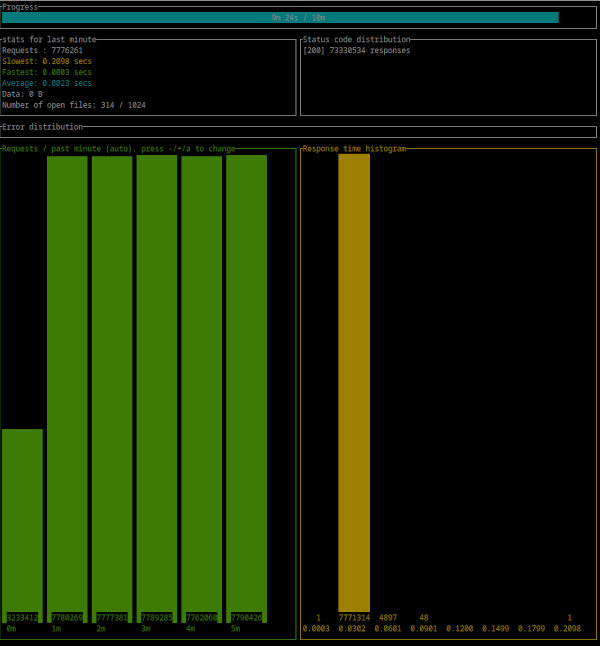
- CPU : Intel(R) Xeon(R) CPU E3-1270 v6 @ 3.80GHz
- 300 : simultaneous connections
- Duration : 10 Minutes
- Binary : aralez-x86_64-glibc
Summary:
  Success rate: 100.00%
  Total: 600.0027 secs
  Slowest: 0.2138 secs
  Fastest: 0.0002 secs
  Average: 0.0023 secs
  Requests/sec: 129777.3838

  Total data: 0 B
  Size/request: 0 B
  Size/sec: 0 B

Response time histogram:
  0.000 [1]        |
  0.022 [77668026] |■■■■■■■■■■■■■■■■■■■■■■■■■■■■■■■■
  0.043 [190362]   |
  0.064 [7908]     |
  0.086 [319]      |
  0.107 [4]        |
  0.128 [0]        |
  0.150 [0]        |
  0.171 [0]        |
  0.192 [0]        |
  0.214 [4]        |

Response time distribution:
  10.00% in 0.0012 secs
  25.00% in 0.0016 secs
  50.00% in 0.0020 secs
  75.00% in 0.0026 secs
  90.00% in 0.0033 secs
  95.00% in 0.0040 secs
  99.00% in 0.0078 secs
  99.90% in 0.0278 secs
  99.99% in 0.0434 secs


Details (average, fastest, slowest):
  DNS+dialup: 0.0161 secs, 0.0002 secs, 0.0316 secs
  DNS-lookup: 0.0000 secs, 0.0000 secs, 0.0000 secs

Status code distribution:
  [200] 77866624 responses

Error distribution:
  [158] aborted due to deadline
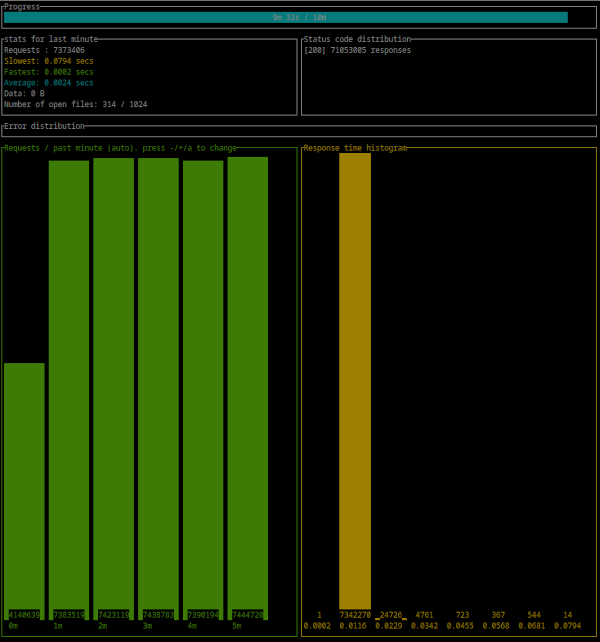
- CPU : Intel(R) Xeon(R) CPU E3-1270 v6 @ 3.80GHz
- 300 : simultaneous connections
- Duration : 10 Minutes
- Binary : aralez-x86_64-musl
Summary:
  Success rate: 100.00%
  Total: 600.0021 secs
  Slowest: 0.2182 secs
  Fastest: 0.0002 secs
  Average: 0.0024 secs
  Requests/sec: 123870.5820

  Total data: 0 B
  Size/request: 0 B
  Size/sec: 0 B

Response time histogram:
  0.000 [1]        |
  0.022 [74254679] |■■■■■■■■■■■■■■■■■■■■■■■■■■■■■■■■
  0.044 [61400]    |
  0.066 [5911]     |
  0.087 [385]      |
  0.109 [0]        |
  0.131 [0]        |
  0.153 [0]        |
  0.175 [0]        |
  0.196 [0]        |
  0.218 [1]        |

Response time distribution:
  10.00% in 0.0012 secs
  25.00% in 0.0016 secs
  50.00% in 0.0021 secs
  75.00% in 0.0028 secs
  90.00% in 0.0037 secs
  95.00% in 0.0045 secs
  99.00% in 0.0077 secs
  99.90% in 0.0214 secs
  99.99% in 0.0424 secs


Details (average, fastest, slowest):
  DNS+dialup: 0.0066 secs, 0.0002 secs, 0.0210 secs
  DNS-lookup: 0.0000 secs, 0.0000 secs, 0.0000 secs

Status code distribution:
  [200] 74322377 responses

Error distribution:
  [228] aborted due to deadline
Aralez, Nginx, Traefik performance benchmark
This benchmark is done on 4 servers. With CPU Intel(R) Xeon(R) E-2174G CPU @ 3.80GHz, 64 GB RAM.
- Sever runs Aralez, Traefik, Nginx on different ports. Tuned as much as I could .
- 3x Upstreams servers, running Nginx. Replying with dummy json hardcoded in config file for max performance.
All servers are connected to the same switch with 1GB port in datacenter , not a home lab. The results:
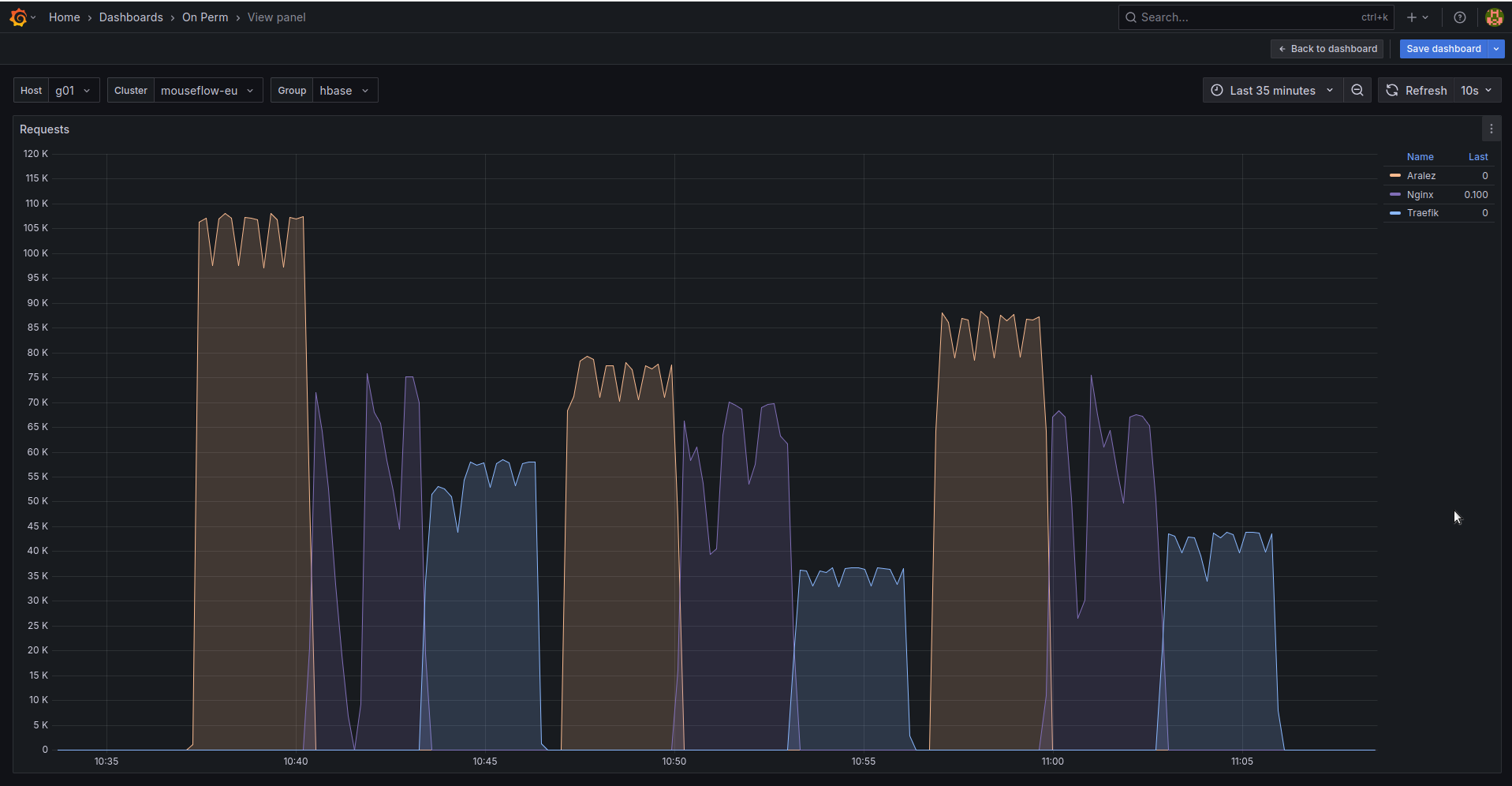
The results show requests per second performed by Load balancer. You can see 3 batches with 800 concurrent users.
- Requests via http1.1 to plain text endpoint.
- Requests to via http2 to SSL endpoint.
- Mixed workload with plain http1.1 and htt2 SSL.
Links
- Documentation : The manual you should read
- Downloads : Binary downloads
- Issues : Issues and requests