mirror of
https://github.com/sadoyan/aralez.git
synced 2026-04-29 22:38:36 +08:00

534 lines
24 KiB
Markdown
534 lines
24 KiB
Markdown

|
||
|
||
---
|
||
|
||
# Aralez (Արալեզ),
|
||
|
||
### **Reverse proxy and service mesh built on top of Cloudflare's Pingora**
|
||
|
||
What Aralez means ?
|
||
**Aralez = Արալեզ** <ins>.Named after the legendary Armenian guardian spirit, winged dog-like creature, that descend upon fallen heroes to lick their wounds and resurrect them.</ins>.
|
||
|
||
Built on Rust, on top of **Cloudflare’s Pingora engine**, **Aralez** delivers world-class performance, security and scalability — right out of the box.
|
||
|
||
[](https://www.buymeacoffee.com/sadoyan)
|
||
|
||
---
|
||
|
||
## 🔧 Key Features
|
||
|
||
- **Dynamic Config Reloads** — Upstreams can be updated live via API, no restart required.
|
||
- **TLS Termination** — Built-in OpenSSL support.
|
||
- **Automatic load of certificates** — Automatically reads and loads certificates from a folder, without a restart.
|
||
- **Upstreams TLS detection** — Aralez will automatically detect if upstreams uses secure connection.
|
||
- **Built in rate limiter** — Limit requests to server, by setting up upper limit for requests per seconds, per virtualhost.
|
||
- **Global rate limiter** — Set rate limit for all virtualhosts.
|
||
- **Per path rate limiter** — Set rate limit for specific paths. Path limits will override global limits.
|
||
- **Authentication** — Supports Basic Auth, API tokens, and JWT verification.
|
||
- **Basic Auth**
|
||
- **API Key** via `x-api-key` header
|
||
- **JWT Auth**, with tokens issued by Aralez itself via `/jwt` API
|
||
- ⬇️ See below for examples and implementation details.
|
||
- **Load Balancing Strategies**
|
||
- Round-robin
|
||
- Failover with health checks
|
||
- Sticky sessions via cookies
|
||
- **Unified Port** — Serve HTTP and WebSocket traffic over the same connection.
|
||
- **Built in file server** — Build in minimalistic file server for serving static files, should be added as upstreams for public access.
|
||
- **Memory Safe** — Created purely on Rust.
|
||
- **High Performance** — Built with [Pingora](https://github.com/cloudflare/pingora) and tokio for async I/O.
|
||
|
||
## 🌍 Highlights
|
||
|
||
- ⚙️ **Upstream Providers:**
|
||
- `file` Upstreams are declared in config file.
|
||
- `consul` Upstreams are dynamically updated from Hashicorp Consul.
|
||
- 🔁 **Hot Reloading:** Modify upstreams on the fly via `upstreams.yaml` — no restart needed.
|
||
- 🔮 **Automatic WebSocket Support:** Zero config — connection upgrades are handled seamlessly.
|
||
- 🔮 **Automatic GRPC Support:** Zero config, Requires `ssl` to proxy, gRPC handled seamlessly.
|
||
- 🔮 **Upstreams Session Stickiness:** Enable/Disable Sticky sessions globally.
|
||
- 🔐 **TLS Termination:** Fully supports TLS for upstreams and downstreams.
|
||
- 🛡️ **Built-in Authentication** Basic Auth, JWT, API key.
|
||
- 🧠 **Header Injection:** Global and per-route header configuration.
|
||
- 🧪 **Health Checks:** Pluggable health check methods for upstreams.
|
||
- 🛰️ **Remote Config Push:** Lightweight HTTP API to update configs from CI/CD or other systems.
|
||
|
||
---
|
||
|
||
## 📁 File Structure
|
||
|
||
```
|
||
.
|
||
├── main.yaml # Main configuration loaded at startup
|
||
├── upstreams.yaml # Watched config with upstream mappings
|
||
├── etc/
|
||
│ ├── server.crt # TLS certificate (required if using TLS)
|
||
│ └── key.pem # TLS private key
|
||
```
|
||
|
||
---
|
||
|
||
## 🛠 Configuration Overview
|
||
|
||
### 🔧 `main.yaml`
|
||
|
||
| Key | Example Value | Description |
|
||
|----------------------------------|--------------------------------------|----------------------------------------------------------------------------------------------------|
|
||
| **threads** | 12 | Number of running daemon threads. Optional, defaults to 1 |
|
||
| **runuser** | aralez | Optional, Username for running aralez after dropping root privileges, requires to launch as root |
|
||
| **rungroup** | aralez | Optional,Group for running aralez after dropping root privileges, requires to launch as root |
|
||
| **daemon** | false | Run in background (boolean) |
|
||
| **upstream_keepalive_pool_size** | 500 | Pool size for upstream keepalive connections |
|
||
| **pid_file** | /tmp/aralez.pid | Path to PID file |
|
||
| **error_log** | /tmp/aralez_err.log | Path to error log file |
|
||
| **upgrade_sock** | /tmp/aralez.sock | Path to live upgrade socket file |
|
||
| **config_address** | 0.0.0.0:3000 | HTTP API address for pushing upstreams.yaml from remote location |
|
||
| **config_tls_address** | 0.0.0.0:3001 | HTTPS API address for pushing upstreams.yaml from remote location |
|
||
| **config_tls_certificate** | etc/server.crt | Certificate file path for API. Mandatory if proxy_address_tls is set, else optional |
|
||
| **proxy_tls_grade** | (high, medium, unsafe) | Grade of TLS ciphers, for easy configuration. High matches Qualys SSL Labs A+ (defaults to medium) |
|
||
| **config_tls_key_file** | etc/key.pem | Private Key file path. Mandatory if proxy_address_tls is set, else optional |
|
||
| **proxy_address_http** | 0.0.0.0:6193 | Aralez HTTP bind address |
|
||
| **proxy_address_tls** | 0.0.0.0:6194 | Aralez HTTPS bind address (Optional) |
|
||
| **proxy_certificates** | etc/certs/ | The directory containing certificate and key files. In a format {NAME}.crt, {NAME}.key. |
|
||
| **upstreams_conf** | etc/upstreams.yaml | The location of upstreams file |
|
||
| **log_level** | info | Log level , possible values : info, warn, error, debug, trace, off |
|
||
| **hc_method** | HEAD | Healthcheck method (HEAD, GET, POST are supported) UPPERCASE |
|
||
| **hc_interval** | 2 | Interval for health checks in seconds |
|
||
| **master_key** | 5aeff7f9-7b94-447c-af60-e8c488544a3e | Master key for working with API server and JWT Secret generation |
|
||
| **file_server_folder** | /some/local/folder | Optional, local folder to serve |
|
||
| **file_server_address** | 127.0.0.1:3002 | Optional, Local address for file server. Can set as upstream for public access |
|
||
| **config_api_enabled** | true | Boolean to enable/disable remote config push capability |
|
||
|
||
### 🌐 `upstreams.yaml`
|
||
|
||
- `provider`: `file` or `consul`
|
||
- File-based upstreams define:
|
||
- Hostnames and routing paths
|
||
- Backend servers (load-balanced)
|
||
- Optional request headers, specific to this upstream
|
||
- Global headers (e.g., CORS) apply to all proxied responses
|
||
- Optional authentication (Basic, API Key, JWT)
|
||
|
||
---
|
||
|
||
## 🛠 Installation
|
||
|
||
Download the prebuilt binary for your architecture from releases section of [GitHub](https://github.com/sadoyan/aralez/releases) repo
|
||
Make the binary executable `chmod 755 ./aralez-VERSION` and run.
|
||
|
||
File names:
|
||
|
||
| File Name | Description |
|
||
|---------------------------|--------------------------------------------------------------------------|
|
||
| `aralez-x86_64-musl.gz` | Static Linux x86_64 binary, without any system dependency |
|
||
| `aralez-x86_64-glibc.gz` | Dynamic Linux x86_64 binary, with minimal system dependencies |
|
||
| `aralez-aarch64-musl.gz` | Static Linux ARM64 binary, without any system dependency |
|
||
| `aralez-aarch64-glibc.gz` | Dynamic Linux ARM64 binary, with minimal system dependencies |
|
||
| `sadoyan/aralez` | Docker image on Debian 13 slim (https://hub.docker.com/r/sadoyan/aralez) |
|
||
|
||
**Via docker**
|
||
|
||
```shell
|
||
docker run -d \
|
||
-v /local/path/to/config:/etc/aralez:ro \
|
||
-p 80:80 \
|
||
-p 443:443 \
|
||
sadoyan/aralez
|
||
```
|
||
|
||
## 💡 Note
|
||
|
||
In general **glibc** builds are working faster, but have few, basic, system dependencies for example :
|
||
|
||
```
|
||
linux-vdso.so.1 (0x00007ffeea33b000)
|
||
libgcc_s.so.1 => /lib/x86_64-linux-gnu/libgcc_s.so.1 (0x00007f09e7377000)
|
||
libm.so.6 => /lib/x86_64-linux-gnu/libm.so.6 (0x00007f09e6320000)
|
||
libc.so.6 => /lib/x86_64-linux-gnu/libc.so.6 (0x00007f09e613f000)
|
||
/lib64/ld-linux-x86-64.so.2 (0x00007f09e73b1000)
|
||
```
|
||
|
||
These are common to any Linux systems, so the binary should work on almost any Linux system.
|
||
|
||
**musl** builds are 100% portable, static compiled binaries and have zero system depencecies.
|
||
In general musl builds have a little less performance.
|
||
The most intensive tests shows 107k-110k requests per second on **Glibc** binaries against 97k-100k **Musl** ones.
|
||
|
||
## 🔌 Running the Proxy
|
||
|
||
```bash
|
||
./aralez -c path/to/main.yaml
|
||
```
|
||
|
||
## 🔌 Systemd integration
|
||
|
||
```bash
|
||
cat > /etc/systemd/system/aralez.service <<EOF
|
||
[Service]
|
||
Type=forking
|
||
PIDFile=/run/aralez.pid
|
||
ExecStart=/bin/aralez -d -c /etc/aralez.conf
|
||
ExecReload=kill -QUIT $MAINPID
|
||
ExecReload=/bin/aralez -u -d -c /etc/aralez.conf
|
||
EOF
|
||
```
|
||
|
||
```bash
|
||
systemctl enable aralez.service.
|
||
systemctl restart aralez.service.
|
||
```
|
||
|
||
## 💡 Example
|
||
|
||
A sample `upstreams.yaml` entry:
|
||
|
||
```yaml
|
||
provider: "file"
|
||
sticky_sessions: false
|
||
to_https: false
|
||
rate_limit: 10
|
||
headers:
|
||
- "Access-Control-Allow-Origin:*"
|
||
- "Access-Control-Allow-Methods:POST, GET, OPTIONS"
|
||
- "Access-Control-Max-Age:86400"
|
||
authorization:
|
||
type: "jwt"
|
||
creds: "910517d9-f9a1-48de-8826-dbadacbd84af-cb6f830e-ab16-47ec-9d8f-0090de732774"
|
||
myhost.mydomain.com:
|
||
paths:
|
||
"/":
|
||
rate_limit: 20
|
||
to_https: false
|
||
headers:
|
||
- "X-Some-Thing:Yaaaaaaaaaaaaaaa"
|
||
- "X-Proxy-From:Hopaaaaaaaaaaaar"
|
||
servers:
|
||
- "127.0.0.1:8000"
|
||
- "127.0.0.2:8000"
|
||
"/foo":
|
||
to_https: true
|
||
headers:
|
||
- "X-Another-Header:Hohohohoho"
|
||
servers:
|
||
- "127.0.0.4:8443"
|
||
- "127.0.0.5:8443"
|
||
"/.well-known/acme-challenge":
|
||
healthcheck: false
|
||
servers:
|
||
- "127.0.0.1:8001"
|
||
```
|
||
|
||
**This means:**
|
||
|
||
- Sticky sessions are disabled globally. This setting applies to all upstreams. If enabled all requests will be 301 redirected to HTTPS.
|
||
- HTTP to HTTPS redirect disabled globally, but can be overridden by `to_https` setting per upstream.
|
||
- Requests to each hosted domains will be limited to 10 requests per second per virtualhost.
|
||
- Requests limits are calculated per requester ip plus requested virtualhost.
|
||
- If the requester exceeds the limit it will receive `429 Too Many Requests` error.
|
||
- Optional. Rate limiter will be disabled if the parameter is entirely removed from config.
|
||
- Requests to `myhost.mydomain.com/` will be limited to 20 requests per second.
|
||
- Requests to `myhost.mydomain.com/` will be proxied to `127.0.0.1` and `127.0.0.2`.
|
||
- Plain HTTP to `myhost.mydomain.com/foo` will get 301 redirect to configured TLS port of Aralez.
|
||
- Requests to `myhost.mydomain.com/foo` will be proxied to `127.0.0.4` and `127.0.0.5`.
|
||
- Requests to `myhost.mydomain.com/.well-known/acme-challenge` will be proxied to `127.0.0.1:8001`, but healthcheks are disabled.
|
||
- SSL/TLS for upstreams is detected automatically, no need to set any config parameter.
|
||
- Assuming the `127.0.0.5:8443` is SSL protected. The inner traffic will use TLS.
|
||
- Self-signed certificates are silently accepted.
|
||
- Global headers (CORS for this case) will be injected to all upstreams.
|
||
- Additional headers will be injected into the request for `myhost.mydomain.com`.
|
||
- You can choose any path, deep nested paths are supported, the best match chosen.
|
||
- All requests to servers will require JWT token authentication (You can comment out the authorization to disable it),
|
||
- Firs parameter specifies the mechanism of authorisation `jwt`
|
||
- Second is the secret key for validating `jwt` tokens
|
||
|
||
---
|
||
|
||
## 🔄 Hot Reload
|
||
|
||
- Changes to `upstreams.yaml` are applied immediately.
|
||
- No need to restart the proxy — just save the file.
|
||
- If `consul` provider is chosen, upstreams will be periodically update from Consul's API.
|
||
|
||
---
|
||
|
||
## 🔐 TLS Support
|
||
|
||
To enable TLS for A proxy server: Currently only OpenSSL is supported, working on Boringssl and Rustls
|
||
|
||
1. Set `proxy_address_tls` in `main.yaml`
|
||
2. Provide `tls_certificate` and `tls_key_file`
|
||
|
||
---
|
||
|
||
## 📡 Remote Config API
|
||
|
||
Push new `upstreams.yaml` over HTTP to `config_address` (`:3000` by default). Useful for CI/CD automation or remote config updates.
|
||
URL parameter. `key=MASTERKEY` is required. `MASTERKEY` is the value of `master_key` in the `main.yaml`
|
||
|
||
```bash
|
||
curl -XPOST --data-binary @./etc/upstreams.txt 127.0.0.1:3000/conf?key=${MASTERKEY}
|
||
```
|
||
|
||
---
|
||
|
||
## 🔐 Authentication (Optional)
|
||
|
||
- Adds authentication to all requests.
|
||
- Only one method can be active at a time.
|
||
- `basic` : Standard HTTP Basic Authentication requests.
|
||
- `apikey` : Authentication via `x-api-key` header, which should match the value in config.
|
||
- `jwt`: JWT authentication implemented via `araleztoken=` url parameter. `/some/url?araleztoken=TOKEN`
|
||
- `jwt`: JWT authentication implemented via `Authorization: Bearer <token>` header.
|
||
- To obtain JWT a token, you should send **generate** request to built in api server's `/jwt` endpoint.
|
||
- `master_key`: should match configured `masterkey` in `main.yaml` and `upstreams.yaml`.
|
||
- `owner` : Just a placeholder, can be anything.
|
||
- `valid` : Time in minutes during which the generated token will be valid.
|
||
|
||
**Example JWT token generation request**
|
||
|
||
```bash
|
||
PAYLOAD='{
|
||
"master_key": "910517d9-f9a1-48de-8826-dbadacbd84af-cb6f830e-ab16-47ec-9d8f-0090de732774",
|
||
"owner": "valod",
|
||
"valid": 10
|
||
}'
|
||
|
||
TOK=`curl -s -XPOST -H "Content-Type: application/json" -d "$PAYLOAD" http://127.0.0.1:3000/jwt | cut -d '"' -f4`
|
||
echo $TOK
|
||
```
|
||
|
||
**Example Request with JWT token**
|
||
|
||
With `Authorization: Bearer` header
|
||
|
||
```bash
|
||
curl -H "Authorization: Bearer ${TOK}" -H 'Host: myip.mydomain.com' http://127.0.0.1:6193/
|
||
```
|
||
|
||
With URL parameter (Very useful if you want to generate and share temporary links)
|
||
|
||
```bash
|
||
curl -H 'Host: myip.mydomain.com' "http://127.0.0.1:6193/?araleztoken=${TOK}`"
|
||
```
|
||
|
||
**Example Request with API Key**
|
||
|
||
```bash
|
||
curl -H "x-api-key: ${APIKEY}" --header 'Host: myip.mydomain.com' http://127.0.0.1:6193/
|
||
|
||
```
|
||
|
||
**Example Request with Basic Auth**
|
||
|
||
```bash
|
||
curl -u username:password -H 'Host: myip.mydomain.com' http://127.0.0.1:6193/
|
||
|
||
```
|
||
|
||
## 📃 License
|
||
|
||
[Apache License Version 2.0](https://www.apache.org/licenses/LICENSE-2.0)
|
||
|
||
---
|
||
|
||
## 🧠 Notes
|
||
|
||
- Uses Pingora under the hood for efficiency and flexibility.
|
||
- Designed for edge proxying, internal routing, or hybrid cloud scenarios.
|
||
- Transparent, fully automatic WebSocket upgrade support.
|
||
- Transparent, fully automatic gRPC proxy.
|
||
- Sticky session support.
|
||
- HTTP2 ready.
|
||
|
||
📊 Why Choose Aralez? – Feature Comparison
|
||
|
||
### 🧩 Summary Table: Aralez vs Competitors (At a Glance)
|
||
|
||
| Feature / Proxy | **Aralez** | **Nginx** | **HAProxy** | **Traefik** | **Caddy** | **Envoy** |
|
||
|----------------------------------|:-----------:|:----------------------------:|:--------------------:|:---------------------:|:----------:|:----------:|
|
||
| **Hot Reload (Zero Downtime)** | ✅ Yes | ⚠️ Partial (graceful reload) | ⚠️ Partial | ✅ Yes | ✅ Yes | ✅ Yes |
|
||
| **Auto Cert Reload (from disk)** | ✅ Yes | ❌ No | ❌ No | ✅ Yes (Let's Encrypt) | ✅ Yes | ⚠️ Partial |
|
||
| **Auth: Basic / API Key / JWT** | ✅ Yes | ⚠️ Basic only | ⚠️ Basic only | ✅ Yes | ✅ Yes | ✅ Yes |
|
||
| **TLS / HTTP2 Termination** | ✅ Yes | ✅ Yes | ✅ Yes | ✅ Yes | ✅ Yes | ✅ Yes |
|
||
| **Built-in A+ TLS Grades** | ✅ Yes | ⚠️ Depends on config | ⚠️ Depends | ⚠️ Depends | ✅ Yes | ⚠️ Depends |
|
||
| **Automatic gRPC Proxy** | ✅ Yes | ❌ No | ❌ No | ✅ Yes | ✅ Yes | ✅ Yes |
|
||
| **Automatic SSL Proxy** | ✅ Yes | ⚠️ Manual | ⚠️ Manual | ✅ Yes | ✅ Yes | ✅ Yes |
|
||
| **Automatic HTTP2 Proxy** | ✅ Yes | ⚠️ Requires config | ⚠️ Requires config | ✅ Yes | ✅ Yes | ✅ Yes |
|
||
| **Automatic WebSocket Proxy** | ✅ Yes | ⚠️ Manual upgrade | ⚠️ Manual upgrade | ✅ Yes | ✅ Yes | ✅ Yes |
|
||
| **Sticky Sessions** | ✅ Yes | ✅ Yes | ✅ Yes | ✅ Yes | ⚠️ Limited | ✅ Yes |
|
||
| **Prometheus Metrics** | ✅ Yes | ⚠️ Via exporter | ✅ Native | ✅ Native | ✅ Native | ✅ Native |
|
||
| **Consul Integration** | ✅ Yes | ❌ No | ⚠️ Partial (via DNS) | ✅ Yes | ❌ No | ✅ Yes |
|
||
| **Kubernetes Integration** | ✅ Yes | ⚠️ Via ingress controller | ⚠️ External | ✅ Native | ⚠️ Limited | ✅ Native |
|
||
| **Request Limiter** | ✅ Yes | ✅ Yes | ✅ Yes | ✅ Yes | ✅ Yes | ✅ Yes |
|
||
| **Serve Static Files** | ✅ Yes | ✅ Yes | ⚠️ Basic | ✅ Yes | ✅ Yes | ❌ No |
|
||
| **Upstream Health Checks** | ✅ Yes | ✅ Yes | ✅ Yes | ✅ Yes | ✅ Yes | ✅ Yes |
|
||
| **Built With** | 🦀 **Rust** | C | C | Go | Go | C++ |
|
||
|
||
---
|
||
|
||
✅ **Yes** – Native support
|
||
⚠️ **Partial / configurable** – Available via plugins, modules, or indirect configuration
|
||
❌ **No** – Not supported or requires major workarounds
|
||
|
||
## 💡 Simple benchmark by [Oha](https://github.com/hatoo/oha)
|
||
|
||
⚠️ These benchmarks use :
|
||
|
||
- 3 async Rust echo servers on a local network with 1Gbit as upstreams.
|
||
- A dedicated server for running **Aralez**
|
||
- A dedicated server for running **Oha**
|
||
- The following upstreams configuration.
|
||
- 9 test URLs from simple `/` to nested up to 7 subpaths.
|
||
|
||
```yaml
|
||
myhost.mydomain.com:
|
||
paths:
|
||
"/":
|
||
to_https: false
|
||
headers:
|
||
- "X-Proxy-From:Aralez"
|
||
servers:
|
||
- "192.168.211.211:8000"
|
||
- "192.168.211.212:8000"
|
||
- "192.168.211.213:8000"
|
||
"/ping":
|
||
to_https: false
|
||
headers:
|
||
- "X-Some-Thing:Yaaaaaaaaaaaaaaa"
|
||
- "X-Proxy-From:Aralez"
|
||
servers:
|
||
- "192.168.211.211:8000"
|
||
- "192.168.211.212:8000"
|
||
```
|
||
|
||
## 💡 Results reflect synthetic performance under optimal conditions.
|
||
|
||
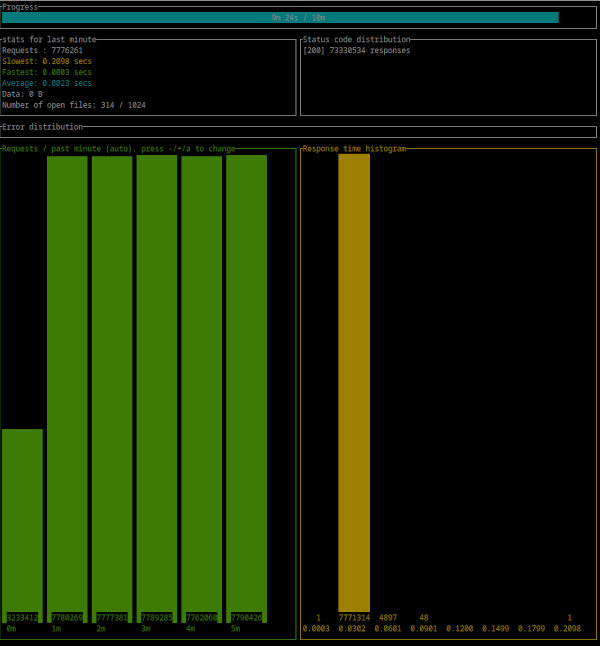
- CPU : Intel(R) Xeon(R) CPU E3-1270 v6 @ 3.80GHz
|
||
- 300 : simultaneous connections
|
||
- Duration : 10 Minutes
|
||
- Binary : aralez-x86_64-glibc
|
||
|
||
```
|
||
Summary:
|
||
Success rate: 100.00%
|
||
Total: 600.0027 secs
|
||
Slowest: 0.2138 secs
|
||
Fastest: 0.0002 secs
|
||
Average: 0.0023 secs
|
||
Requests/sec: 129777.3838
|
||
|
||
Total data: 0 B
|
||
Size/request: 0 B
|
||
Size/sec: 0 B
|
||
|
||
Response time histogram:
|
||
0.000 [1] |
|
||
0.022 [77668026] |■■■■■■■■■■■■■■■■■■■■■■■■■■■■■■■■
|
||
0.043 [190362] |
|
||
0.064 [7908] |
|
||
0.086 [319] |
|
||
0.107 [4] |
|
||
0.128 [0] |
|
||
0.150 [0] |
|
||
0.171 [0] |
|
||
0.192 [0] |
|
||
0.214 [4] |
|
||
|
||
Response time distribution:
|
||
10.00% in 0.0012 secs
|
||
25.00% in 0.0016 secs
|
||
50.00% in 0.0020 secs
|
||
75.00% in 0.0026 secs
|
||
90.00% in 0.0033 secs
|
||
95.00% in 0.0040 secs
|
||
99.00% in 0.0078 secs
|
||
99.90% in 0.0278 secs
|
||
99.99% in 0.0434 secs
|
||
|
||
|
||
Details (average, fastest, slowest):
|
||
DNS+dialup: 0.0161 secs, 0.0002 secs, 0.0316 secs
|
||
DNS-lookup: 0.0000 secs, 0.0000 secs, 0.0000 secs
|
||
|
||
Status code distribution:
|
||
[200] 77866624 responses
|
||
|
||
Error distribution:
|
||
[158] aborted due to deadline
|
||
```
|
||
|
||
|
||
|
||
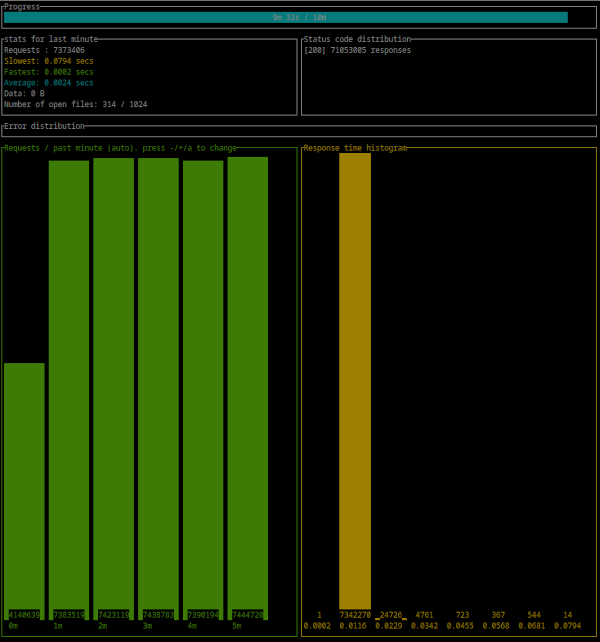
- CPU : Intel(R) Xeon(R) CPU E3-1270 v6 @ 3.80GHz
|
||
- 300 : simultaneous connections
|
||
- Duration : 10 Minutes
|
||
- Binary : aralez-x86_64-musl
|
||
|
||
```
|
||
Summary:
|
||
Success rate: 100.00%
|
||
Total: 600.0021 secs
|
||
Slowest: 0.2182 secs
|
||
Fastest: 0.0002 secs
|
||
Average: 0.0024 secs
|
||
Requests/sec: 123870.5820
|
||
|
||
Total data: 0 B
|
||
Size/request: 0 B
|
||
Size/sec: 0 B
|
||
|
||
Response time histogram:
|
||
0.000 [1] |
|
||
0.022 [74254679] |■■■■■■■■■■■■■■■■■■■■■■■■■■■■■■■■
|
||
0.044 [61400] |
|
||
0.066 [5911] |
|
||
0.087 [385] |
|
||
0.109 [0] |
|
||
0.131 [0] |
|
||
0.153 [0] |
|
||
0.175 [0] |
|
||
0.196 [0] |
|
||
0.218 [1] |
|
||
|
||
Response time distribution:
|
||
10.00% in 0.0012 secs
|
||
25.00% in 0.0016 secs
|
||
50.00% in 0.0021 secs
|
||
75.00% in 0.0028 secs
|
||
90.00% in 0.0037 secs
|
||
95.00% in 0.0045 secs
|
||
99.00% in 0.0077 secs
|
||
99.90% in 0.0214 secs
|
||
99.99% in 0.0424 secs
|
||
|
||
|
||
Details (average, fastest, slowest):
|
||
DNS+dialup: 0.0066 secs, 0.0002 secs, 0.0210 secs
|
||
DNS-lookup: 0.0000 secs, 0.0000 secs, 0.0000 secs
|
||
|
||
Status code distribution:
|
||
[200] 74322377 responses
|
||
|
||
Error distribution:
|
||
[228] aborted due to deadline
|
||
```
|
||
|
||
|
||
|
||
## 🚀 Aralez, Nginx, Traefik performance benchmark
|
||
|
||
This benchmark is done on 4 servers. With CPU Intel(R) Xeon(R) E-2174G CPU @ 3.80GHz, 64 GB RAM.
|
||
|
||
1. Sever runs Aralez, Traefik, Nginx on different ports. Tuned as much as I could .
|
||
2. 3x Upstreams servers, running Nginx. Replying with dummy json hardcoded in config file for max performance.
|
||
|
||
All servers are connected to the same switch with 1GB port in datacenter , not a home lab. The results:
|
||
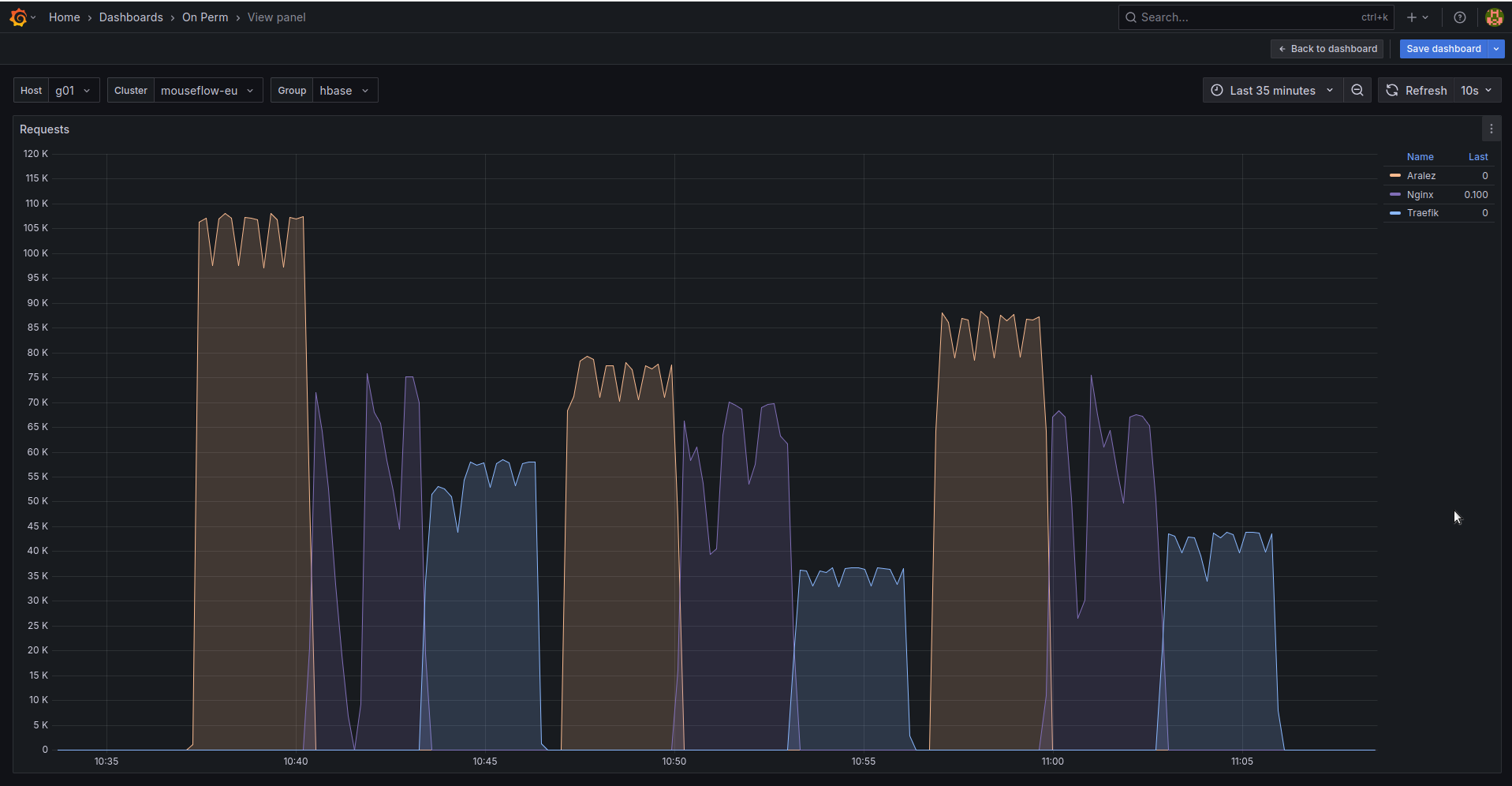
|
||
|
||
The results show requests per second performed by Load balancer. You can see 3 batches with 800 concurrent users.
|
||
|
||
1. Requests via http1.1 to plain text endpoint.
|
||
2. Requests to via http2 to SSL endpoint.
|
||
3. Mixed workload with plain http1.1 and htt2 SSL.
|
||
|