
---
# Aralez (Արալեզ)
### **Reverse proxy built on top of Cloudflare's Pingora**
Aralez is a high-performance Rust reverse proxy with zero-configuration automatic protocol handling, TLS, and upstream management, featuring Consul and Kubernetes integration for dynamic pod discovery and health-checked routing, acting as a
lightweight ingress-style proxy.
---
What Aralez means ? **Aralez = Արալեզ** Named after the legendary Armenian guardian spirit, winged dog-like creature, that descend upon fallen heroes to lick their wounds and resurrect them.
Built on Rust, on top of **Cloudflare’s Pingora engine**, **Aralez** delivers world-class performance, security and scalability — right out of the box.
---
## Links
- [**Documentation**](https://aralez.rs) : The manual you should read
- [**Downloads**](https://github.com/sadoyan/aralez/releases) : Binary downloads
- [**Issues**](https://github.com/sadoyan/aralez/issues) : Issues and requests
- [**Crates**](https://crates.io/crates/aralez) : The Rust crate registry
- [**DockerHUB**](https://hub.docker.com/r/sadoyan/aralez) : DockerHUB official repository
- [**GitHUB Packages**](https://github.com/sadoyan/aralez/pkgs/container/aralez) : GitHUB ghcr.io images
---
## Key Features
- **Dynamic Config Reloads** — Upstreams can be updated live via API, no restart required.
- **Autoload of certificates** — Automatically loads new/changed certificates from a folder, without a restart.
- **Let’s Encrypt Certificates** — Ordering and renewal of SSL/TLS certificates via the HTTP-01 challenge.
- **Upstreams TLS detection** — Aralez will automatically detect if upstreams uses secure connection.
- **Built in rate limiter** — Globar or route limit requests to upstreams.
- **Caching Proxy** — In memory cache with configurable TTL, without external dependencies.
- **Authentication** — Supports Basic Auth, API tokens, and JWT verification.
- **Basic Auth**
- **API Key** via `x-api-key` header
- **JWT Auth**, with tokens issued by Aralez itself via `/jwt` API
- **Forward Auth**, Sends requests to an authentication server.
- **Load Balancing** Round-robin, health checks, optional sticky sessions.
- **Built in file server** — Build in minimalistic file server for serving static files, should be added as upstreams for public access.
- **Upstream Providers:**
- `file` Upstreams are declared in config file.
- `consul` Upstreams are dynamically updated from Hashicorp Consul.
- `kubernetes` Upstreams are dynamically updated from kubernetes api server.
- **Auto WebSocket Support:** WS connection upgrades are handled automatically.
- **Auto gRPC Support:** gRPC detected and handled automatically.
- **Header Injection:** Global and per-route server/client headers injection.
- **Remote Config Push:** Lightweight HTTP API to update configs from CI/CD or other systems.
- **Memory Safe** — 100% Rust.
- **High Performance** — Built with [Pingora](https://github.com/cloudflare/pingora) and tokio for async I/O.
---
## Configuration Overview
### `main.yaml`
| Key | Example Value | Description |
|----------------------------------|---------------------------------------------------|-------------------------------------------------------------------------------------------------------------------------------------------------------|
| **threads** | `12` | Number of worker threads assigned to proxy operations. Defaults to `1`. |
| **runuser** | `aralez` | Optional. Username to run as after dropping root privileges (requires launch as root). |
| **rungroup** | `aralez` | Optional. Group to run as after dropping root privileges (requires launch as root). |
| **cache** | Optional Block | If omitted entirely, caching is disabled. |
| **cache.storage** | `hybrid` | Storage backend: `"memory"`, `"hybrid"`, or `"redis://host:port"`. Defaults to `"memory"`. |
| **cache.mem_size_mb** | `64` | Optional. Memory cache tier limit in megabytes. Defaults to `64`. |
| **cache.file_size_mb** | `128` | Optional. Disk cache tier limit in megabytes (hybrid mode). Defaults to `512`. |
| **cache.file_path** | `/tmp/cache` | Optional. Directory path for the disk cache tier. Defaults to `/tmp/aralez_cache`. |
| **cache.item_max_size** | `5` | Optional. Maximum allowed size for a single cached item in megabytes. Defaults to `5`. |
| **cache.flush_interval** | `60` | Optional. Interval in seconds to flush memory cache states to disk (hybrid mode). Defaults to `60`. |
| **cache.ttl** | `300` | Optional. Default TTL in seconds used when upstream Cache-Control headers are absent. Defaults to `300`. |
| **upstream_keepalive_pool_size** | `500` | Maximum number of keepalive connections pooled for upstream targets. |
| **pid_file** | `/tmp/aralez.pid` | File system path where the daemon process ID is written. |
| **error_log** | `/tmp/aralez_err.log` | Optional. File path for directing standard error log output when enabled. |
| **upgrade_sock** | `/tmp/aralez.sock` | Unix domain socket path used for zero-downtime binary upgrades and state handoffs. |
| **config_api_enabled** | `true` | Boolean toggle to enable/disable remote runtime configuration push capability. |
| **config_address** | `0.0.0.0:3000` | HTTP API bind address for pushing runtime config updates. |
| **proxy_address_http** | `0.0.0.0:6193` | Primary bind address and port for incoming plain-text HTTP proxy traffic. |
| **proxy_address_tls** | `0.0.0.0:6194` | Optional bind address and port for incoming secure TLS proxy traffic. |
| **proxy_configs** | `/etc/aralez` | Path to directory containing SSL certs and keys in format `{NAME}.crt` and `{NAME}.key`. |
| **upstreams_conf** | `/etc/aralez/upstreams.yaml` | File system path pointing to upstream service routing definitions. |
| **proxy_tls_grade** | `high` | Security grade of TLS cipher suite (`high`, `medium`, `unsafe`). `high` matches Qualys SSL Labs A+. |
| **file_server_folder** | `/opt/public` | Optional. Local file system directory to serve statically. |
| **file_server_address** | `0.0.0.0:3002` | Optional. Local bind address for static file server. |
| **log_level** | `info` | Global logging verbosity threshold (`info`, `warn`, `error`, `debug`, `trace`, `off`). |
| **access_log** | `all` | Access logging mode (`all`, `error`). Omit/comment out to disable. |
| **log_pattern** | `{d(%Y-%m-%d %H:%M:%S)} {h({l})} - {t} - {m} {n}` | Optional custom log pattern. Defaults to `{d(%Y-%m-%d %H:%M:%S)} {l} - {m}{n}`. |
| **log_file** | `/tmp/aralez.log, 20, 5, compress` | Optional file logging config: path, max size (MB), rotated files to keep, compression. |
| **log_structured** | `elasticsearch` | Optional structured logging sink target (e.g., `elasticsearch`). |
| **acme_dns_provider** | `cloudflare` | DNS provider API integration for automated ACME DNS-01 challenges (`cloudflare`, `route53`, `digitalocean`). |
| **hc_method** | `HEAD` | HTTP health check method verb (`HEAD`, `GET`, `POST` in UPPERCASE). |
| **hc_interval** | `5` | Time interval in seconds between periodic upstream health checks. |
| **cluster_member** | `master` | Optional. Operational role in multi-node cluster mode (`master`, `worker`). |
| **worker_nodes** | `http://127.0.0.1:8000, http://127.0.0.1:4000` | Required if `cluster_member: master`. Comma-separated worker management endpoints. |
| **tcp** | Optional Block | Optional advanced Linux TCP socket parameters. Do not alter unless tuned for specific network environments. Values shown act as operational defaults. |
| **tcp.tcp_keepalive_idle** | `30` | Seconds of socket inactivity before sending TCP keepalive probes. Defaults to `30`. |
| **tcp.tcp_keepalive_interval** | `10` | Seconds between individual keepalive probes if no response. Defaults to `10`. |
| **tcp.tcp_keepalive_count** | `5` | Maximum unanswered probes before declaring connection dead. Defaults to `5`. |
| **tcp.so_reuseport** | `true` | Enables `SO_REUSEPORT` for multi-worker connection distribution without lock contention. Defaults to `true`. |
| **tcp.tcp_fastopen** | `4096` | Enables TCP Fast Open backlog queue size. Set to `0` if unsupported by host kernel/container. Defaults to `4096`. |
---
## Installation
Download the prebuilt binary for your architecture from releases section of [GitHub](https://github.com/sadoyan/aralez/releases) repo Make the binary executable `chmod 755 ./aralez-VERSION` and run.
File names:
| File Name | Description |
|---------------------------------|----------------------------------------------------------------------------|
| `aralez-x86_64-musl.gz` | Static Linux x86_64 binary, without any system dependency |
| `aralez-x86_64-glibc.gz` | Dynamic Linux x86_64 binary, with minimal system dependencies |
| `aralez-x86_64-compat-musl.gz` | Static Linux x86_64 binary, compatible with old pre Haswell CPUs |
| `aralez-x86_64-compat-glibc.gz` | Dynamic Linux x86_64 binary, compatible with old pre Haswell CPUs |
| `aralez-aarch64-musl.gz` | Static Linux ARM64 binary, without any system dependency |
| `aralez-aarch64-glibc.gz` | Dynamic Linux ARM64 binary, with minimal system dependencies |
| `sadoyan/aralez` | Docker image on Debian 13 slim () |
## About binaries
**glibc** builds are in general faster, but have few, basic, Glibc dependencies:
**musl** builds are 100% portable, static compiled binaries and have zero system dependencies. In general musl builds have a little less performance.
The most intensive tests shows 107k-110k requests per second on **Glibc** binaries against 97k-100k **Musl** ones.
For running **Aralez** on very old hardware, CPUs prior Haswell, (launched before 2013) use `aralez-x86_64-compat-*.gz`
For getting the best performance on newer hardware use `aralez-x86_64-*.gz`.
**Via docker**
```shell
docker run -d -v /path/to/config:/etc/aralez:rw -p 80:80 -p 443:443 sadoyan/aralez
docker run -d -v /path/to/config:/etc/aralez:rw -p 80:80 -p 443:443 sadoyan/aralez:compat
docker run -d -v /path/to/config:/etc/aralez:rw -p 80:80 -p 443:443 ghcr.io/sadoyan/aralez:latest
docker run -d -v /path/to/config:/etc/aralez:rw -p 80:80 -p 443:443 ghcr.io/sadoyan/aralez:compat
```
**Dockerfile :**
```dockerfile
FROM debian:trixie-slim
RUN apt-get update && apt-get install -y ca-certificates curl net-tools iputils-ping
RUN apt-get clean && rm -rf /var/lib/apt/lists/*
COPY aralez /usr/local/bin/aralez
RUN chmod +x /usr/local/bin/aralez
RUN mkdir -p /etc/aralez/certs/upstreams
WORKDIR /etc/aralez
ENTRYPOINT ["/usr/local/bin/aralez", "-c", "/etc/aralez/main.yaml"]
```
## Running the Proxy
```bash
./aralez -c path/to/main.yaml
```
## Systemd integration
Assuming Aralez in installed in `/opt/aralez` folder
```bash
cat > /etc/systemd/system/aralez.service <` header.
- To obtain JWT a token, you should send **generate** request to built in api server's `/jwt` endpoint.
- `master_key`: should match configured `masterkey` in `main.yaml` and `upstreams.yaml`.
- `owner` : Just a placeholder, can be anything.
- `valid` : Time in minutes during which the generated token will be valid.
**Example JWT token generation request**
```bash
PAYLOAD='{
"master_key": "910517d9-f9a1-48de-8826-dbadacbd84af-cb6f830e-ab16-47ec-9d8f-0090de732774",
"owner": "valod",
"valid": 10
}'
TOK=`curl -s -XPOST -H "Content-Type: application/json" -d "$PAYLOAD" http://127.0.0.1:3000/jwt | cut -d '"' -f4`
echo $TOK
```
**Example Request with JWT token**
With `Authorization: Bearer` header
```bash
curl -H "Authorization: Bearer ${TOK}" -H 'Host: myip.mydomain.com' http://127.0.0.1:6193/
```
With URL parameter (Very useful if you want to generate and share temporary links)
```bash
curl -H 'Host: myip.mydomain.com' "http://127.0.0.1:6193/?araleztoken=${TOK}`"
```
**Example Request with API Key**
```bash
curl -H "x-api-key: ${APIKEY}" --header 'Host: myip.mydomain.com' http://127.0.0.1:6193/
```
**Example Request with Basic Auth**
```bash
curl -u username:password -H 'Host: myip.mydomain.com' http://127.0.0.1:6193/
```
## License
[Apache License Version 2.0](https://www.apache.org/licenses/LICENSE-2.0)
---
## Notes
- Uses Pingora under the hood for efficiency and flexibility.
- Designed for edge proxying, internal routing, or hybrid cloud scenarios.
- Transparent, fully automatic WebSocket upgrade support.
- Transparent, fully automatic gRPC proxy.
- Sticky session support.
- HTTP2 ready.
### Summary Table: Feature Comparison
| Feature / Proxy | **Aralez** | **Nginx** | **HAProxy** | **Traefik** | **Caddy** | **Envoy** |
|--------------------|:----------:|:-----------:|:-----------:|:-----------:|:----------:|:---------:|
| **Reload** | ✅ Hot | ⚙️ Manual | ⚙️ Manual | ✅ Hot | ✅ Hot | ✅ Hot |
| **Cert load** | ✅ Hot | ❌ Reload | ❌ Reload | ✅ Yes | ✅ Yes | ⚙️ No ? |
| **Authentication** | ✅ Yes | ⚙️ Limited | ⚙️ Limited | ✅ Yes | ✅ Yes | ✅ Yes |
| **HTTP2** | ✅ Yes | ⚙️ Manual | ⚙️ Manual | ✅ Yes | ✅ Yes | ✅ Yes |
| **TLS Grades** | ✅ Yes | ⚙️ Manual | ⚙️ Manual | ⚙️ Manual | ✅ Yes | ⚙️ Manual |
| **gRPC** | ✅ Auto | ⚙️ Manual | ⚙️ Manual | ⚙️ Manual | ⚙️ Manual | ⚙️ Manual |
| **SSL Proxy** | ✅ Auto | ⚙️ Manual | ⚙️ Manual | ✅ Yes | ✅ Yes | ✅ Yes |
| **HTTP/2** | ✅ Auto | ⚙️ Manual | ⚙️ Manual | ✅ Yes | ✅ Yes | ✅ Yes |
| **WebSocket** | ✅ Auto | ⚙️ Manual | ⚙️ Manual | ✅ Yes | ✅ Yes | ✅ Yes |
| **Sticky Session** | ✅ Yes | ❌ No | ⚙️ Yes | ✅ Yes | ⚙️ Limited | ✅ Manual |
| **Prometheus** | ✅ Yes | ⚙️ External | ✅ Yes | ✅ Yes | ✅ Yes | ✅ Yes |
| **Consul** | ✅ Yes | ❌ No | ⚙️DNS API | ✅ Yes | ❌ No | ✅ Yes |
| **Kubernetes** | ✅ Yes | ⚙️ Ingress | ⚙️ External | ✅ Yes | ⚙️ Limited | ✅ Yes |
| **Limiter** | ✅ Yes | ✅ Yes | ✅ Yes | ✅ Yes | ✅ Yes | ✅ Yes |
| **Static Files** | ✅ Yes | ✅ Yes | ⚙️ Lua ? | ✅ Yes | ✅ Yes | ❌ No |
| **Health Checks** | ✅ Yes | ⚙️ Manual | ⚙️ Manual | ✅ Yes | ✅ Yes | ✅ Yes |
| **Built With** | Rust | C | C | Go | Go | C++ |
---
✅ **Auto** – Automatically detected and loaded
✅ **Hot** – Works immediately, no reload/restart is required
✅ **Yes** – Works immediately, no setup required
⚙️ **Manual** – Requires explicit configuration or modules
⚙️ **Reload** – Reload or restart is required
⚙️ **Limited** – Support is limited to certain features
⚙️ **External** – Requires an external module
❌ **No** – Not supported
## Simple benchmark by [Oha](https://github.com/hatoo/oha)
**These benchmarks use :**
- 3 async Rust echo servers on a local network with 1Gbit as upstreams.
- A dedicated server for running **Aralez**
- A dedicated server for running **Oha**
- The following upstreams configuration.
- 9 test URLs from simple `/` to nested up to 7 subpaths.
```yaml
myhost.mydomain.com:
paths:
"/":
to_https: false
headers:
- "X-Proxy-From:Aralez"
servers:
- "192.168.211.211:8000"
- "192.168.211.212:8000"
- "192.168.211.213:8000"
"/ping":
to_https: false
headers:
- "X-Some-Thing:Yaaaaaaaaaaaaaaa"
- "X-Proxy-From:Aralez"
servers:
- "192.168.211.211:8000"
- "192.168.211.212:8000"
```
## Results reflect synthetic performance under optimal conditions.
- CPU : Intel (R) Xeon (R) CPU E3-1270 v6 @ 3.80GHz
- 300 : simultaneous connections
- Duration : 10 Minutes
- Binary : aralez-x86_64-glibc
```
Summary:
Success rate: 100.00%
Total: 600.0027 secs
Slowest: 0.2138 secs
Fastest: 0.0002 secs
Average: 0.0023 secs
Requests/sec: 129777.3838
Total data: 0 B
Size/request: 0 B
Size/sec: 0 B
Response time histogram:
0.000 [1] |
0.022 [77668026] |■■■■■■■■■■■■■■■■■■■■■■■■■■■■■■■■
0.043 [190362] |
0.064 [7908] |
0.086 [319] |
0.107 [4] |
0.128 [0] |
0.150 [0] |
0.171 [0] |
0.192 [0] |
0.214 [4] |
Response time distribution:
10.00% in 0.0012 secs
25.00% in 0.0016 secs
50.00% in 0.0020 secs
75.00% in 0.0026 secs
90.00% in 0.0033 secs
95.00% in 0.0040 secs
99.00% in 0.0078 secs
99.90% in 0.0278 secs
99.99% in 0.0434 secs
Details (average, fastest, slowest):
DNS+dialup: 0.0161 secs, 0.0002 secs, 0.0316 secs
DNS-lookup: 0.0000 secs, 0.0000 secs, 0.0000 secs
Status code distribution:
[200] 77866624 responses
Error distribution:
[158] aborted due to deadline
```
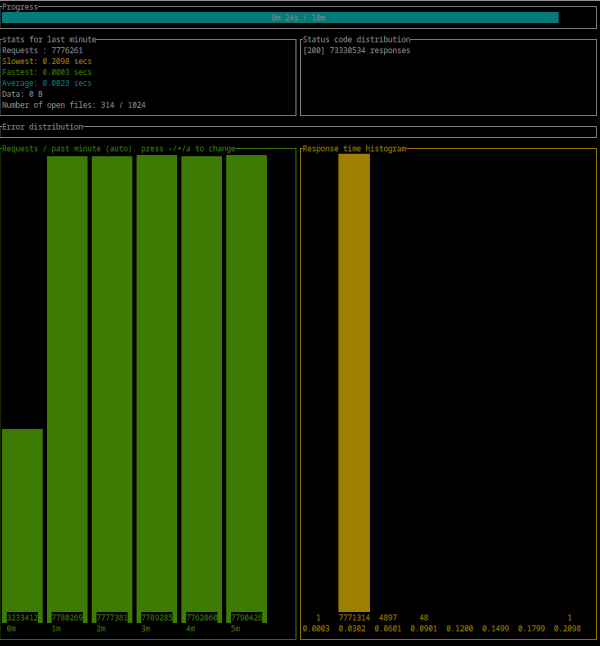
- CPU : Intel (R) Xeon (R) CPU E3-1270 v6 @ 3.80GHz
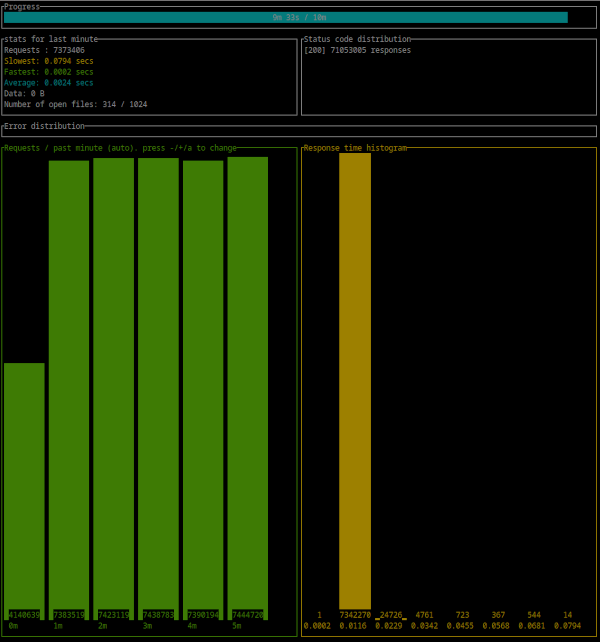
- 300 : simultaneous connections
- Duration : 10 Minutes
- Binary : aralez-x86_64-musl
```
Summary:
Success rate: 100.00%
Total: 600.0021 secs
Slowest: 0.2182 secs
Fastest: 0.0002 secs
Average: 0.0024 secs
Requests/sec: 123870.5820
Total data: 0 B
Size/request: 0 B
Size/sec: 0 B
Response time histogram:
0.000 [1] |
0.022 [74254679] |■■■■■■■■■■■■■■■■■■■■■■■■■■■■■■■■
0.044 [61400] |
0.066 [5911] |
0.087 [385] |
0.109 [0] |
0.131 [0] |
0.153 [0] |
0.175 [0] |
0.196 [0] |
0.218 [1] |
Response time distribution:
10.00% in 0.0012 secs
25.00% in 0.0016 secs
50.00% in 0.0021 secs
75.00% in 0.0028 secs
90.00% in 0.0037 secs
95.00% in 0.0045 secs
99.00% in 0.0077 secs
99.90% in 0.0214 secs
99.99% in 0.0424 secs
Details (average, fastest, slowest):
DNS+dialup: 0.0066 secs, 0.0002 secs, 0.0210 secs
DNS-lookup: 0.0000 secs, 0.0000 secs, 0.0000 secs
Status code distribution:
[200] 74322377 responses
Error distribution:
[228] aborted due to deadline
```
## Aralez, Nginx, Traefik performance benchmark
This benchmark is done on 4 servers. With CPU Intel (R) Xeon (R) E-2174G CPU @ 3.80GHz, 64 GB RAM.
1. Sever runs Aralez, Traefik, Nginx on different ports. Tuned as much as I could .
2. 3x Upstreams servers, running Nginx. Replying with dummy json hardcoded in config file for max performance.
All servers are connected to the same switch with 1GB port in datacenter , not a home lab. The results:
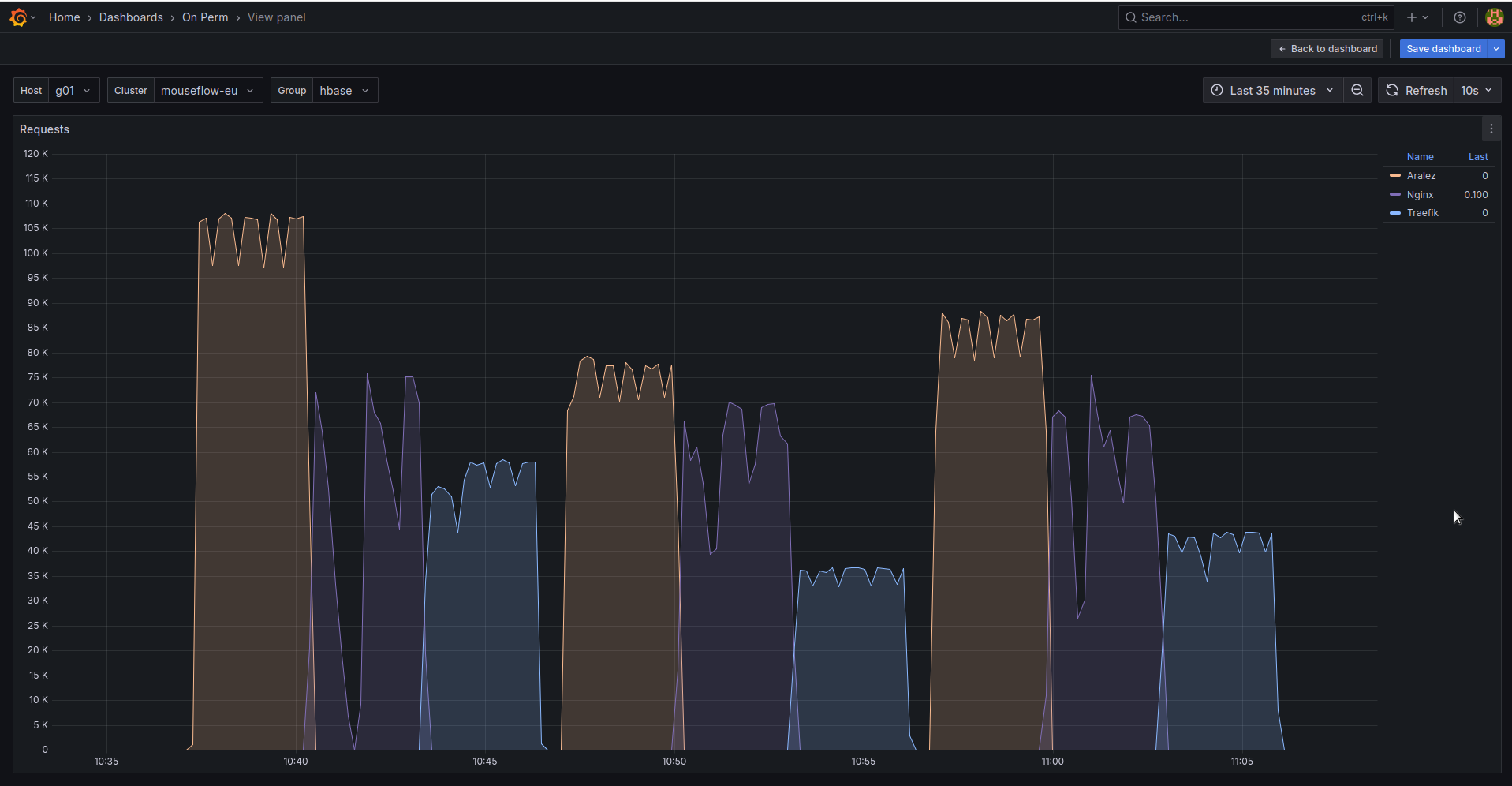
The results show requests per second performed by Load balancer. You can see 3 batches with 800 concurrent users.
1. Requests via http1.1 to plain text endpoint.
2. Requests to via http2 to SSL endpoint.
3. Mixed workload with plain http1.1 and htt2 SSL.